An average Shopify store owner usually juggles about 6 different apps at the same time to keep things running smoothly. For innovative developers, SaaS founders, and enterprise brands, launching a Shopify app is a highly profitable move.
However, it is totally normal to have that one looming doubt before you dive in: Realistically, how much does it cost to build a Shopify app in 2026? Generally, building your own Shopify app costs between $5,000 to $100,000+.
To calculate a realistic budget, you should look beneath the surface. It involves understanding framework shifts like Hydrogen and Remix to deep AI integrations and advanced billing APIs, and the technical architecture you choose.
In this write-up, our experts for eCommerce app development services will break down the cost of developing a Shopify app. Besides that, we will explore its types, development phases, cost drivers, and hidden expenses.
Shopify App Development Cost Overview
Remember that the real cost of your Shopify app is tied directly to its complexity, the depth of its integration, and its UI requirements. Generally, developing your own Shopify app falls into three distinct tiers:
App Category
Average Cost Range
Development Timeline
Low Complexity
($5,000) – ($10,000)
2 – 4 Weeks
Medium Complexity
($10,000) – ($30,000)
1 – 3 Months
High Complexity
($30,000) – ($60,000+)
3 – 6+ Months
For those looking to hire a development expert, it’s a great idea to compare portfolios and pricing through the Shopify Partner Directory.
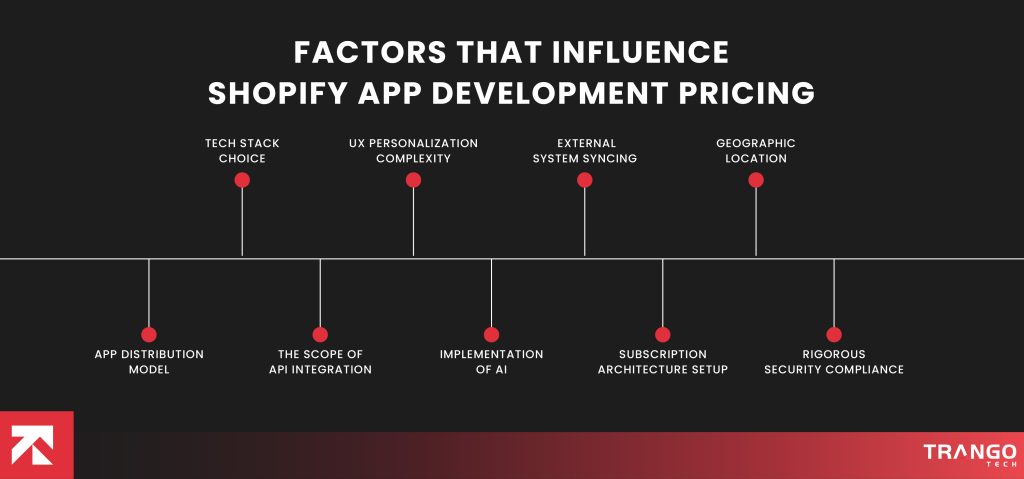
Factors That Influence Shopify App Development Pricing
You should know that the cost to build a Shopify app is like an iceberg. It looks average on the surface, but is driven by several direct and indirect development factors.
Your final quote represents the exact sum of your technical choices, user experience standards, and structural scaling requirements.
Even a single miscalculation here will double your developer invoices before you even reach beta testing.
To construct an accurate financial roadmap, one must consider all distinct factors that exert the greatest influence on costs.
1. App Distribution Model
Your decision between a Custom or Public app immediately sets your baseline pricing path. To be real, custom applications primarily address specific operational bottlenecks for a designated merchant.
As a result, they bypass the grueling Shopify App Store review process, that too with a zero multi-tenant data architecture.
Unlike that, Public apps are commercial products designed to serve thousands of distinct stores simultaneously. For that purpose, developers build highly isolated database environments and build complex, custom onboarding flows.
All this with a strict adherence to compliance and rigid security protocols. In fact, this becomes more expensive due to substantial development hours.
2. Tech Stack Choice
Research shows that 60% of your Shopify app success relies on a set of technologies you use. Taking that into account, your development team shall make use of a precisely chosen tech stack.
While using this specific collection of languages and frameworks, your total dev hours might change, ultimately affecting project costs. Modern JavaScript frameworks like Remix and Next.js are heavily dominated. More than that, utilizing official toolkits requires a premium, highly specialized engineering skill set.
Those who opt for cutting-edge headless architecture or decoupled frontends via Hydrogen shall expect a higher development rate.
3. The Scope of API Integration
Your Shopify API integration cost scales in direct proportion to how deeply it interacts with internal data layers. Utilizing basic REST APIs for simple read-and-write tasks is not that pricey.
However, building high-volume applications that process thousands of instantaneous webhooks per minute requires advanced engineering.
This is why programmers have to spend significant time writing intricate rate-limiting logic. Along with that, they have to use queue mechanisms to prevent your application from hitting API throttling thresholds.
4. UX Personalization Complexity
Those who utilize standard components from Shopify Polaris will enjoy lean, predictable, and budget-friendly UI.
However, if your application requires highly customized dashboards, data visualizations, drag-and-drop builders, or animations, expect a slightly higher quote for your project.
When you break away from standard Polaris components, design, and frontend engineering, it increases the overall development hours.
5. Implementation of AI
Artificial intelligence is what separates an average business from a thriving one. But this distinction does not come easily; it takes a premium development cost.
For instance, for apps that automate AI-driven bots, ML-powered recommendations, and dynamic pricing algorithms, developers will have to build custom middleware first. It later needs to be interfaced with LLM providers like OpenAI or Anthropic.
More than that, you will need separate hours to train, fine-tune, and securely pipe store data into these models. This unified effort pushes a project beyond your budget to enterprise-level territory.
6. External System Syncing
An app that runs only within the Shopify store dashboard is a lot less expensive to build than one that is an operational bridge.
Once your app is required to sync bi-directional data with external systems that are complex and legacy, things get more complicated.
Developers have to spend weeks configuring webhooks, map the data fields from the external web services, and add error-recovery logic.
In case of external systems failure, they even have to ensure that the data is consistent across all systems.
7. Subscription Architecture Setup
Creating a comprehensive financial framework is essential to monetize a public app, and a strong focus on the backend is non-negotiable.
You should also construct a protected billing structure. In order to go to the App Store, the Billing API shall work as required.
Moreover, developers have to write logic for dealing with one-time payment, metered usage billing, or monthly tiered billing.
Just remember that the development cost will increase if you want to add multi-currency billing and localization tax per country.
8. Geographic Location
The location where your business exists is likely to be the biggest variable on your final bill. For instance, when you work with a top-tier full-service agency in North America or Western Europe, a solid budget is required.
With seamless communication and turnkey product management, they charge hourly from $100 to more than $180.
On the other hand, in emerging tech hubs like South Asia, Shopify app developers cost you around $25 to $45 per hour.
To be precise, your budget is just as much determined by which type of freelance, offshore team, or domestic agency you go for as it is by your feature list.
9. Rigorous Security Compliance
Shopify requires 100% adherence to data privacy regulations such as GDPR and CCPA, as well as enforced automated customer data deletion webhooks.
The process of preparing an app for the official review process includes a lot of security auditing, setting up protected OAuth authentication loops, and carrying out vulnerability assessments.
Neglecting this will result in an instant rejection of your application, and additional time and money will be spent rebuilding the code for security compliance.
For that purpose, you should act proactively by calling for security compliance in your initial budget planning.
Step-by-Step Cost to Build a Shopify App
Wondering where your money goes once you approve the development proposal? This looks simple on paper, but tough in practice. Behind such an easy-to-read final invoice is an end-to-end development process that accounts for all spending.
In fact, each phase of building a Shopify app requires an engineering specialist, tools, and effort. To pull back the curtain on this process, let’s look at the financial weight of each individual step, one by one:
Step 1: Product Discovery
First and foremost, developers start with an app prototype. Consider this your architectural base, and it takes about 10-15% of your entire budget.
You’re hiring a business analyst and a lead architect to chart all the data flows, APIs, and webhooks that you need, rather than coding your own.
That’s where you need to choose between REST or GraphQL, create a product requirements doc, and create a roadmap to ensure your developers do not make expensive U-turns later.
This has the potential to make a mess of the house in the end, and more likely, it will almost always cost three times as much as if it were done right the first time.
Cost: Approx. $1000 – $4500
Step 2: UI/UX Design
After the blueprints have been finalized, the project goes to visual designers, who will cost you 15% to 20% of your Shopify app development budget.
The phase is all about how the merchant experiences your app, and how you make sure it feels like the real thing, clean, and ridiculously easy to navigate.
Your designer will take Shopify’s official design principles, Polaris, and apply them to create mockups and clickable prototypes in Figma.
With user journey mapping, dark/light mode layouts, and mobile-responsive screens, you will prevent merchants from leaving your app due to usability issues.
Cost: Approx. ($2000 – $7000)
Step 3: Backend Coding
This is the hard work part where the rubber hits the road, and consumes nearly half of your custom Shopify app development cost.
You will hire senior backend developers to build databases, establish secure OAuth loops, and implement key functionality.
They will put into the high-end technology like Remix or Node.js to make sure its performance remains impeccable.
Furthermore, you have to build your server-side setup here. It prevents your app from crashing and integrates your logic with Shopify’s core.
Cost: $5,000 – $25,000+
Step 4: Shopify Integration
It’s time for the front-end engineers to take over and turn the website into a visual reality, accounting for 15% to 20% of your capital.
This is a step to make the connection between the merchant click and the server’s response inside your app.
Frontend development experts spend their hours turning your Figma designs into clean React/Remix code.
The primary goal here is to integrate your app into the Shopify Admin dashboard using App Bridge and test the layout across different screen sizes.
They make your app load faster, just like Shopify’s actual app, and merchants can’t tell where you end and Shopify starts.
Cost: Roughly $2,000 – $8,000
Step 5: Quality Assurance
The last leg is protection and compliance, which will cost you approximately 10-15% of your project budget.
In this case, QA engineers invest days into attempting to break your app, running load tests, and simulating edge case errors by users.
Moreover they are testing database vulnerabilities and ensuring your required GDPR webhooks go through.
It takes air-tight security to pass the stringent App Store inspection. This last investment guarantees that your app isn’t rejected.
Cost: Approx. $1500 – $5000
Hidden Costs Associated with Shopify App Development Cost
What if I say that quote sitting in your inbox represents less than half of what you will actually spend? Sounds weird? It should be. Most of us fall into the trap of treating Shopify development as just a one-time physical purchase. However, reality is far more different.
Consider your Shopify app more like a live SaaS business that incurs daily structural and operational bills. Don’t exhaust your entire capital pool during the core build phase, leaving yourself financially stranded.
To ensure your commercial runway doesn’t run dry post-launch, I have mentioned certain hidden cost variables that frequently slip under the radar.
● Server Infrastructure
App pages are loaded through Shopify, but application code and merchant databases are located on separate cloud servers such as AWS, Heroku, or Google Cloud.
When your app becomes large enough to process a high volume of automated Shopify webhooks, then a hidden cost trap sets in.
To prevent these data bottlenecks, the server configuration(s) must be robust and highly available. Your workers must have queues to process hundreds of events per second.
In a poor optimization of your cloud scaling logic, you can suddenly face monthly infrastructure bills of more than $1,500 USD, just from a small base fee.
● Version Deprecations
Shopify is extremely aggressive and update-oriented, sending out new API versions every 3 months and deprecating old API versions after 1 year.
This will make the main code of your application expire one by one each year.
Your app will break entirely; the merchant users will start to experience unexpected server errors.
Moreover, it will break completely, and the merchant users will experience unexpected server errors.
Just to keep up with Shopify’s ever-changing core platform, you should expect to spend 15% to 20% of your original build budget annually.
● Technical Troubleshooting
When you publish your app on the Shopify App Store, you’re suddenly a customer service provider who’s expected to respond to Shopify store owners worldwide.
A merchant’s storefront is open 24 hours a day and will not wait for your app to experience a bug that hinders quick checkout or slow checkout times. They expect it to be quick, responsive, and flawless against all problems.
The cost of paying for a specialized platform such as Zendesk or Intercom for customer support can add a lot to your budget.
Plus, the actual technical support folks who can review error logs and resolve installation issues on customized merchant themes are also not accounted for.
● Customer Acquisition
Having a great Shopify app is nothing without a great presence for it. Since you will be working in a very competitive niche, this is not gonna be easy.
You will need to invest real money into App Store Ads, conversion-focused copy, polished promotional video explainer, and, of course, SEO strategies.
Getting organic momentum can typically take a marketing push that costs between $2,000 and $5,000 per month. It is something that you don’t have to pay as part of your programming invoice.
● Multi-Theme Compatibility
There are hundreds of different themes available for Shopify stores, from the official Online Store 2.0 to older legacy scripts or a fully custom headless front end.
If you have added or adjusted elements on the live store page, there is a definite chance of them interfering.
With CSS stylesheets or JavaScript frameworks, it is not gonna be easy to tweak as required for your app.
Even more, this takes a lot of development hours after launch, writing out edge cases to get the stores to look correct.
Also, writing out code overrides to make them look different for each theme will increase your labor costs compared to a normal app.
● Advanced Automated Engine
The implementation of a standard recurring app billing is pretty easy. However, developing more complex billing structures entails hidden backend hours.
Advanced subscription tiers, dynamic pricing based on usage, or partner affiliate kickbacks take a fair share from your budget.
This is due to building more complex monitoring databases. Though pricey, they show real-time store metrics, managing user proration or downgrading purchases mid-billing cycle.
Besides that, failed merchant payments through Shopify’s Billing API demand heavy lifting in the backend to raise your invoice.
● Data Privacy Compliance
If you have an e-commerce integration app, you will be handling sensitive customer data, and you will have stringent regulatory duties.
It is important that your software is compliant with data frameworks, such as GDPR, CCPA, and regular PCI security evaluations.
You need to invest in solid data in-transit and data at-rest encryption, set up secure data in-transit and at-rest deletion points, and professional security scans.
Also, a critical expense that enterprise brands should anticipate is cyber liability insurance to safeguard their business.
● Revenue Share Transitions
Shopify has a well-established growth incentive program, with its 0% platform commission on your first $1,000,000 in gross annual app sales.
But once your scaling app surpasses that million-dollar revenue threshold, according to Shopify’s marketplace rules, it will start to take a 15% cut on all future sales.
This is a significant change in operation and will need to be considered as a long-term margin shift and capital runway.
If you hit this operating threshold, it will make a difference to your processing costs and financial baseline numbers.
If you feel like optimizing your Shopify app development pricing is simply just cutting corners, you’d be half right here. Neither do you have to find the absolute lowest hourly developer rate, nor should you go for no-code app builders.
Remember that running after the cheapest price tag usually backfires. It results in messy, unoptimized code that you’ll have to spend twice as long to completely rebuild six months later.
For us at Trango Tech, true Shopify app development cost optimization means getting the product to market faster, building smarter, and choosing the right frameworks.
Check out some of the most practical ways to optimize your development costs to keep your project well within budget while launching a highly stable application:
1. Launch with a Laser-Focused MVP
The most sure-fire path to an out-of-control development budget is to indulge in feature creep or the urge to add every cool thing.
One must ruthlessly trim the features of your product down to a Minimum Viable Product that addresses a single, painful merchant problem.
Let’s assume that if you are working on a loyalty app, do not worry about all the bells and whistles that are not paramount.
Advanced gamification, tier-one VIP integrations, or custom gift card engines are and will remain your target focus.
With the lean launch, you can try the market, collect real customer feedback, and get early sales of your product.
2. Standardize Your UI Using Shopify Polaris
Creating a custom, bespoke interface dashboard from scratch can be a complete sink for designer and front-end dev hours.
In fact, save thousands of dollars by teaching your team to create the whole dashboard with Shopify Polaris.
Your front-end developers can use a vast library of ready-to-use, pre-coded layout pieces. data tables, navigation tabs, and modal pop-ups, to name a few.
As an added bonus, Polaris guarantees your application looks just like the native application, in the same style as their native Shopify admin panel.
3. Maximize Native App Extensions
Historically, apps would work by inserting custom JavaScript strings directly into a store owner’s theme code.
It is inevitably causing layout displays to break and manual developer support to be required to fix them, for an endless list of them.
You can optimize your cost for Shopify app development through theme app extensions. This approach ensures your app looks amusing and packages it up in neat blocks.
No more support tickets from frustrated merchants with stores that are broken-looking, and your developers won’t waste hours dealing with cross-theme issues.
4. Leverage boilerplate Templates
Shopify offers official, pre-configured app boilerplates for popular and modern tech stacks such as Remix, React, and Node.js.
They are the out-of-the-box repositories. supported by inbuilt OAuth authentication loops, embedded App Bridge connections, and standardized webhooks already mapped out.
If you ensure that your development partner uses these official templates, you can save up to two weeks on your setup bill.
5. Build with Modern GraphQL
Data processing efficiency will depend a lot on the endpoints a mobile application communicates with.
With Legacy REST APIs, apps must make many hefty network requests to retrieve a single bundle of data.
This can soon become a burden on your performance and cause penalties from Shopify’s rate limits.
Your app can then make a single, minimal query to get exactly what it’s looking for if you build your architecture around GraphQL.
As a result, your data pipelines run incredibly fast, saving developers many hours from endlessly working out complex rate-limiting solutions.
6. Outsource Cleverly
One of the biggest levers you have to perfect your cash runway is where your dev team actually is located.
A premium agency in North America or Western Europe comes in; you’ll be paying up to $180 an hour.
On the other hand, relocating your engineering team to Asian countries has world-class architects, engineers, and testers.
They charge around $25 to $45 per hour. With this structural arbitrage, you can get the best of both worlds in terms of technical execution.
7. Automate the QA Testing
Don’t fall into the myth of automated testing frameworks as a cost; manual QA testing is a sure way to increase costs.
If a developer introduces a bug in step 5, it is easy for them to do so without realizing they have broken an asset created back in step 2.
Without automated unit testing scripts, you’re likely to have some of those hidden regressions make it to production.
By investing a small portion of your budget, you can get automated regression tests to affirm every update is up to the mark.
As soon as you install it, it saves precious weeks of manual bug-hunting and saves your brand from damage.
Wrapping Up
To be precise, Shopify app development costs range from $5,000 to $100,000+ for your upcoming project.
No matter if you are up to automating intricate back-office workflows for your own brand or launching a commercial SaaS product to disrupt the App Store, hope this guide helped.
Note that cutting corners on the development phase always costs more in the long run. Bugs, slow load times, and poor API integrations will drain your revenue.
Since the existing Shopify ecosystem relies on strict, fast-moving framework updates and quarterly API versioning, DIYing yourself can be a bit tricky.
You need specialists at the back who live and breathe e-commerce architecture. In case you are looking for an established mobile application development solution expert, hire Trango Tech now.
With a proven track record, we have coded 200+ successful apps, with industry-vetted developers, that too with a 4.8/5 stars client rating.
Frequently Asked Questions
Why are the ongoing maintenance costs for Shopify apps so high?
The older API versions are strictly deprecated after 12 months to avoid security issues, or when new functionality is introduced, it could potentially break existing setups. Given the dynamic nature of this field, you can anticipate that you’ll need to allocate approximately 15% to 20%. This is the reason why your Shopify app maintenance costs go high.
Can I build a Shopify app using any programming language?
Yes, you can develop a Shopify app in any programming language. Developers REST and GraphQL APIs to communicate with the platform. The most popular and supported stacks, however, are Node.js, Ruby on Rails, PHP, and Python. On the frontend user interface, developers firmly rely on React and Shopify Polaris to make sure the app appears and functions totally native.
What are the primary hidden infrastructure costs when running a Shopify app?
Live operations are not included in your development invoice. Costs will involve monthly fees for cloud hosting (AWS, Google Cloud, or Heroku), database management, error-tracking software, and data pipelines.
How does Shopify’s commission structure affect public app revenue?
Shopify is really developer-friendly when it comes to new developers. Their current revenue-share terms involve them taking a 0% cut of the first $1,000,000 in annual gross revenue from your store via the Shopify App Store. When your app reaches a million dollars in a calendar year, Shopify takes a 15% cut of your revenue, which is considered the standard fee.
How do I protect my customer data and ensure compliance when building an app?
Your app needs to be fully GDPR and CCPA compliant, and meet Shopify’s rigorous Mandatory Webhooks framework (rules for how data erasure and data request logs are managed). An expert agency guarantees that your application employs safe OAuth protocols, encrypts data at rest and in motion, and securely handles delicate webhooks without exposing your customer databases to the open.
What is the difference between an embedded app and a non-embedded app?
An embedded app is a Shopify app that loads straight inside an app’s user experience inside the Shopify admin panel, providing a seamless and cohesive experience for merchants that never leaves their admin panel. A non-embedded app runs on its own user interface and external domain, typically used for more complex standalone SaaS applications that service multiple e-commerce ecosystems.
How can I get an accurate cost estimate before kicking off development?
A better way of getting a predictable budget is to avoid using hunches and make use of an expert or a tool designed for this purpose. To get a clear idea of your app’s specific requirements, complexity, and objectives before you begin coding, you can leverage specific tools such as the Trango Tech App Development Cost Calculator instantly.
Muhammad Asif is a SEO specialist at Trango Tech, a leading mobile app development company. With a strong background in software development and mobile technology, he specializes in optimizing digital presence for app-based businesses. His expertise in search engine optimization, content strategy, and technical SEO helps improve visibility and drive organic growth. As a passionate tech writer, Muhammad Asif regularly shares informative and insightful articles on mobile app development, emerging technologies, and digital marketing trends. His content empowers businesses and developers with the latest industry insights, ensuring they stay ahead in the competitive world of app development.
Fuel delivery app development typically costs between $5,000 and $150,000+. The range varies along with app type, feature complexity and integration requirements.…
Developing a new application comes with unseen obstacles, like concept failure, financial investment, or technical feasibility. Before investing your hard-earned money, ask…